
UCP Welcome Guide


Welcome to the University Connections Program
Congratulations on joining the University Connections Program (UCP) at the University of Tasmania! You're about to begin an exciting journey that gives you a unique opportunity - the chance to experience university study while still completing your TCE.
What is UCP?
The University Connections Program is a partnership between the University of Tasmania, Tasmanian schools and colleges, and the Office of Tasmanian Assessment Standards and Certification (TASC). This innovative program allows Year 11 and 12 students like you to undertake university units specifically designed for senior secondary students.
The Benefits Are Significant, through the UCP you can:
Study university units for free through our scholarship program
Gain TCE points and potentially ATAR points
Get a head start on your university education
Develop university study skills early
Experience university life while still at college
Potentially reduce the time it takes to complete your future degree
About this Guide
We've created this comprehensive guide to help you navigate your UCP journey successfully. Think of it as your roadmap to university study - it covers everything you need to know to get started and succeed in your studies.
How to use this Guide
We recommend starting at the beginning and working through each section as you need it. Keep it handy throughout your studies - you'll likely refer back to different sections as you progress through your UCP journey. To make the most of your UCP experience:
Ready to begin?
The following sections will guide you through everything you need to know about studying at university. Whether you're just starting out or returning for another UCP unit, you'll find valuable information to support your journey.
You're not alone in this journey. You have support from both your school and the university, and we're here to help you succeed.
Welcome to the UTAS community!


The Enrolment Process
To become a UCP student, you'll need to complete three important steps in order. Each step is essential - you can't move to the next one until you've completed the previous step. These steps are as follows:
- Complete your initial application
- Get your USI
- Complete an eCAF form
Before you begin
Make sure you have these ready before starting your enrolment:
Step 1: Initial Application
If you’re reading this, chances are that you have already completed your initial application. If that’s not the case, please follow the detailed instructions in the UCP Applications Guide which you can download here:
If you’re still deciding which unit to choose, you can find more information on all of our offerings by reading through the UCP Unit Handbook which you can download by clicking the button below:
After your online application has been actioned, you’ll be sent an email with a link to complete the eCAF online. In order to complete your eCAF, you will first need to obtain an Universal Student Identifier (USI) if you don’t already have one.
Step 2: Get your USI
Your Unique Student Identifier (USI) is much more than just another number - it's your lifelong education record and a crucial part of Australia's national education system. Think of it as your individual education passport that follows you throughout your learning journey. Without a USI, you cannot enrol in any accredited course in Australia, including your UCP units. It is also completely free.
The USI system was created to give students better access to their educational records and to help ensure the quality of Australia's education sector. Your USI creates a secure online record of your nationally recognised training and qualifications gained in Australia, from all training providers you study with. This means your educational achievements are properly tracked and recorded, making it easier to provide evidence of your qualifications to future employers or educational institutions.
Having a USI also means you'll have easy access to your training records and results throughout your life. You can access your USI account online from any computer, tablet, or smart device. This is particularly helpful when applying for jobs or further study, as you can quickly access and share your educational history.
To get your USI:
-
Have one form of ID ready:
- Driver's license
- Medicare card
- Australian passport
- Birth certificate
- Visa (for international students)
- Visit Student Portal
- Follow the steps at this link to create your USI
- Make sure you enter your personal details exactly as they appear on your ID.
- Provide at least two contact methods.
- Save your USI number somewhere safe.
If students or parents would like more information about the Unique Student Identifier, they can check out this website:
Or watch the following video:
Unique Student Identifier (USI) - Video for Students | 1:44
Step 3: Complete your eCAF
The electronic Commonwealth Assistance Form (eCAF) is a crucial step in securing your UCP scholarship and fee-free study at UTAS. The eCAF is a government requirement that ensures you're eligible for Commonwealth support and officially records your acceptance of the scholarship that covers your UCP unit fees.
The eCAF is also your official declaration that you understand your rights and responsibilities as a Commonwealth supported student, even though your UCP unit is covered by a scholarship.
For UCP students, the eCAF process has been specially streamlined. Unlike full-time university students who might need to provide tax file numbers and arrange HELP loans, UCP students simply need to confirm they'll accept the scholarship coverage. This is why it's important to select that you DO NOT wish to apply for a HELP loan - your unit costs are already covered by the scholarship.
If you are completing multiple UCP units in a calendar year, you only need to complete the eCAF once.
To complete your eCAF:
- Log into eStudent with the UTAS credentials that you were provided with after completing your initial application (this is your @utas.edu.au email address).
- Carefully follow all of the instructions on the eCAF How To Guide, ensuring that:
- Section A: You check your auto-filled details
- Section B: You enter your USI number correctly
- Section C: You confirm that you're studying in Australia
- Section D: You select that you DO NOT wish to apply for a HELP loan
- Section E: You read and accept all declarations
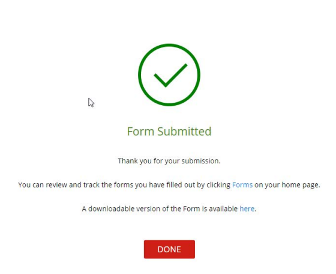
- Wait for the green "form submitted tick" as per the picture below and you are done!



Getting Started at UTAS
As a UCP student, you're now part of both your college and the University of Tasmania community. This unique position gives you access to a wide range of resources, facilities and support services across both institutions. Let's walk through everything you need to know to get started on your university journey.
Your UTAS Account
Your UTAS account is your digital passport to university life. It provides access to all university systems and services, from your email to online learning platforms. Setting up your account properly is crucial - it's the foundation for all your university interactions.
Getting your account set up should be your first priority after enrolment. The process is straightforward but important to get right:
- Visit eStudent
- Use your student ID to create your password
- Set up your security questions
- Download the UTAS app
Take care when setting up your password and security questions - you'll need these throughout your studies. We recommend using a password manager or keeping your details somewhere secure. Never share your login details with anyone else, even if they say they're from the university.
If you are having trouble with this process, you can get answers and access to support here.
Forgotten your password!
If you have forgotten your password at any stage, you can use multi-factor authentication (MFA) verification to reset your passphrase at any time. Visit the password change website and follow the steps.
For more assistance, please contact the IT Service Desk or call 13 UTAS (13 8827).
Your UTAS Email
Your university email account is much more than just another inbox - it's your official communication channel with UTAS. Teaching staff will send important announcements here, you'll receive assignment feedback through this email, and it's how you'll be notified about university events and opportunities.
Think of your UTAS email as your professional university identity. Unlike personal email accounts, your UTAS email gives you credibility when communicating with teaching staff and accessing academic resources.
Accessing your email
Your email can be accessed in several ways to suit your study style:
- Visit Webmail
- Log in with your UTAS username and password
- Check it at least twice a week
- Set it up on your phone for easier access
Many students find it helpful to set up their university email on their mobile phone - this means you won't miss important announcements even when you're not at your computer. Follow this link for more information on how to achieve this.
Student ID Card
Your student ID card is your all-in-one university access card that gives you access to a wide range of services and benefits both on and off campus. Getting your card is a simple process, but it's important to do it early - you'll need it for accessing many university services:
Getting your card
The process is designed to be as convenient as possible:
- Order your Student ID card online by following the instructions on this page
- Choose to collect from campus or have it posted
- Activate it when you receive it
What you can do with your card
Think of your student ID as your university passport. It lets you:
- Borrow from the library
- Print and photocopy on campus
- Access buildings after hours (if required)
- Get student discounts at many businesses
- Use campus facilities


University Assignments and Academic Integrity
Making the transition from school to university assignments can feel like a big step. University assignments often have different expectations and requirements and developing these skills while still at secondary school is also one of the key benefits to completing a UCP unit. This section has been designed to introduce you to some of the key topics relating to assignments and academic integrity. These will be covered in far greater depth during your studies with us.
Academic Integrity and Writing
Academic integrity is at the heart of university study. It's about being honest and ethical in your academic work - making sure that the assignments you submit and the work you do is truly your own. When you use other people's ideas or words, academic integrity means acknowledging them properly through correct referencing. Think of it as showing respect for the academic community you're now part of, while also ensuring that your own original thoughts and contributions are clearly recognised.
For new university students, understanding academic integrity is crucial because it's quite different from high school. At university, you'll be engaging with many different sources and ideas, building on the work of others to develop your own understanding and arguments. You need to be clear about which ideas are yours and which come from other sources. This might seem challenging at first, but it's an essential skill that you'll use throughout your university studies and professional life.
Your teachers would rather you ask questions about academic integrity before submitting work than risk doing the wrong thing.
Understanding Turnitin
Turnitin is one of your most valuable tools for maintaining academic integrity. It's a text-matching system that compares your work against a massive database of academic papers, websites, and other student submissions. When you submit your work to Turnitin, it generates a similarity report that highlights any text that matches other sources. This isn't about catching you out - it's about helping you identify where you need to improve your academic writing, referencing, or paraphrasing.
Think of Turnitin as your academic writing assistant. Before submitting your final assignment, you can use it to check drafts and make sure you've properly referenced all your sources. A high similarity percentage doesn't automatically mean there's a problem - what matters is whether you've acknowledged your sources correctly.
For example, your reference list will always show up as similar to other documents, and that's perfectly fine. The key is learning to interpret your Turnitin reports and use them to improve your academic writing skills. UTAS gives you access to a practice version of Turnitin where you can check your work and develop your skills before submitting assignments.
While this might sound daunting, we've developed comprehensive resources to help you understand and meet these expectations. To find out more, we recommend completing the Turnitin & Academic Writing practice unit.
The topics covered in the unit are as follows:
Module 1. Introduction to academic writing
- How academic integrity and academic writing are related.
- 5 steps to making your own paraphrase.
- Keeping track of your sources when referencing.
- Further advice on academic writing
Module 2. Generate a similarity report + FAQs
- How many times can I upload my paper?
- How long does it take to generate a similarity report on Turnitin?
- Why was Turnitin unable to generate a similarity report for my paper?
- What is an acceptable % on Turnitin similarity report?
- How do I read a Turnitin report?
- How do I access my report on Turnitin?
The following link will take you to the practice space:
In addition to providing you with an introduction to academic writing, the unit also provides you with access to a practice version of Turnitin. This software enables you to generate a similarity report prior to submitting your assignments. If these are new concepts to you, that’s totally ok, that’s what the practice unit is designed for.
APA 7 Referencing
APA 7 (American Psychological Association, 7th edition) is the main referencing style used at UTAS. It's a standardised way of acknowledging other people's work and ideas in your assignments. Think of it as the 'language' we use to show where information comes from - like a trail of breadcrumbs that leads back to your sources.
APA 7 referencing and academic integrity go hand in hand at UTAS. When you reference correctly using APA 7, you're demonstrating academic integrity by clearly showing which ideas are yours and which come from others. It's like giving credit where credit is due - you're being transparent about whose shoulders you're standing on when making your arguments.
Proper referencing using APA 7 helps you:
- Avoid accidental plagiarism
- Showcase your research
- Strengthen your arguments
- Demonstrate your reading skills
- Join the academic conversation
When you submit your work to Turnitin, it will highlight text that matches other sources. This helps you check whether you've:
- Referenced all your quotes correctly
- Paraphrased effectively rather than just changing a few words
- Included all your in-text citations
- Formatted your references properly
Turnitin doesn't check if your APA 7 formatting is perfect - it just shows you where you've used other people's work. It's up to you to make sure you've referenced these properly using APA 7 style. This is why UTAS provides access to referencing guides and support through the library to help you get it right.
These three elements - APA 7 referencing, academic integrity, and Turnitin - work together as your toolkit for good academic practice at UTAS. Think of APA 7 as the method, academic integrity as the principle, and Turnitin as the checking tool that helps you maintain both.
For a more in-depth look at referencing and in particular the APA7 referencing style that we use at UTAS, you can have a look through this online module:


Using MyLO
MyLO (My Learning Online) is your virtual classroom at UTAS. It's where you'll find your course materials, submit assignments, communicate with teaching staff, and engage with other students in your units. As a UCP student, getting familiar with MyLO is essential for your success as most of your course content and activities will be delivered through this platform.
Getting Started with MyLO
Getting started with MyLO is straightforward. The first time you log in, you'll be guided through some basic features and functions to help you navigate the system.
First Access:
- Visit www.utas.edu.au/mylo
- Log in with your UTAS username and password
- Find your UCP unit(s) under 'My Units'
Your UCP units will automatically appear in your MyLO dashboard once your enrolment is complete.
If you don't see them straight away - they typically appear within 24 hours of enrolment confirmation.
What you'll find in MyLO
MyLO is organised to make finding your course materials and activities intuitive. Each unit has its own space where you'll find everything you need for your studies.
Essential Features:
- Unit materials and readings: Access your weekly learning materials, required readings, and additional resources
- Assignment submission links: Submit your work and receive feedback from your teaching staff
- Announcements from your teaching staff: Stay up to date with important information about your units
- Discussion boards: Engage with your classmates and teachers in online discussions
- Marks and feedback: Track your progress and view detailed feedback on your work
- Calendar with important dates: Never miss a deadline or scheduled activity
- Links to online meetings (if required): Join virtual classes or consultation sessions
The layout is consistent across all units, so once you're familiar with one unit, you'll find it easy to navigate others.
Quick Tips for MyLO Success
Making the most of MyLO is about developing good habits early. Here are some proven strategies for success:
- Log in regularly to check for updates: We recommend at least once per day during teaching periods
- Download the free MyLO mobile app: Brilliant for checking announcements and quick updates on the go
- Add due dates to your calendar: MyLO can sync with your device's calendar
- Enable notifications for important announcements: Stay informed without having to constantly check
- Bookmark www.utas.edu.au/mylo for easy access: Save time with direct access
Need more Help?
We understand that learning to use a new system can be challenging, which is why we provide comprehensive support resources. The Using MyLO for the first time student guide covers the following topics:
- MyLO Overview
- Important Guidelines & Support
- Access to MyLO and your Units
- Using MyLO for the First Time
- Unit Overview
- Browser Information
- How to Pin Units in the My Units Widget
- Using the UTAS Mobile App to Access MyLO
- Netiquette for Online Communication
- Discover Course Catalog
- Work to Do Widget
- Unit Outline & Unit Schedule
You can access the guide here:
The guide includes screenshots and video tutorials to help you navigate MyLO effectively. The topics are designed to be referenced as needed throughout your studies.
Technical Support
Our technical support team is available to help you with any MyLO-related issues. Don't hesitate to get in touch if you're having trouble - they're here to help!
- Email: mylo.support@utas.edu.au
- Phone: 1300 304 903
- Live chat available through MyLO
For on-campus students, the activities listed on this page will be done in workshop time. Online students are expected to complete these activities at some stage during Week 1. We will expect all students to have completed all three activities by the end of Week 1. There is no MyLO folder to upload these activities into, and they are not assessed either.


UTAS Systems and Services
University study in the digital age means having access to a suite of online tools and platforms that support your learning journey. As a UCP student, you have access to the same professional-grade digital tools as all university students. These systems are designed to work together seamlessly, creating an integrated digital learning environment.


Making the Move to University Study
Starting university studies while still at college is both exciting and challenging. You're about to experience a different way of learning, complete with new terms, expectations, and ways of working. Let's explore what this transition means and how to manage it successfully.
Understanding University Culture
University learning is quite different from school. You'll notice straight away that there's more independence in how you study and manage your time. Rather than having teachers check on your progress daily, you'll be expected to keep track of your own deadlines and seek help when you need it.
At uni, you'll encounter new terms for familiar things. What you call 'subjects' at school are called 'units' at university. Your teachers are often called 'unit coordinators' or 'lecturers', and instead of classrooms, you might have 'lectures' and 'tutorials'. While this new language might seem confusing at first, you'll quickly get used to it.
Key Differences in Learning Style
The biggest change you'll notice is the emphasis on independent learning. While your school teachers might remind you about upcoming work, at university it's your responsibility to:
- Check MyLo regularly for announcements
- Keep track of assignment due dates
- Complete required readings before class
- Seek help when you need it
University assignments often require more independent research and critical thinking. You'll be expected to read beyond your course materials and form your own arguments based on evidence. This might feel challenging at first, but it's an important skill that will serve you well in your future studies and career.
Managing Your Time
When you're juggling both school and university study, good time management becomes crucial. Start by creating a weekly schedule that includes all your commitments - both school and university. But remember to be flexible; university study often requires more independent work time than you might expect.
Unlike school, university units often have fewer regular classes but require more independent study time. For example, a university unit might have only two hours of class time per week, but expect you to spend another 4-6 hours on independent study, reading, and assignment preparation.
Understanding University Language
You'll come across lots of new terms in your university studies. Here are some of the most important ones to know:
- A unit outline is like your roadmap for each subject. It contains all the important information about assessment tasks, due dates, and learning objectives. Think of it as your instruction manual for the unit - it's worth reading it carefully at the start of semester.
- When people talk about 'academic integrity', they're referring to honesty and ethical behaviour in your studies. This includes properly referencing other people's work and submitting your own original work for assessment.
- Terms like 'census date' are important too - this is the last day you can withdraw from a unit without academic penalty. Make sure you note these key dates in your calendar.
Building Support Networks
One of the best parts of being a UCP student is having access to support from both your school and the university. Your school teachers understand you're taking on additional challenges, and your university teachers know you're balancing different commitments.
Don't hesitate to reach out for help - whether it's to your school's UCP coordinator, your university teachers, or support services like the library or student learning team. They're all there to help you succeed.
Developing University Study Skills
University study requires some different skills from school work. You'll need to:
Learn to take effective notes from lectures and readings - university-level note-taking is about capturing key concepts and ideas, not just copying information.
Develop research skills using the university library and databases. You'll learn to find and evaluate academic sources, which is quite different from general internet searching.
Get comfortable with academic writing, which has its own style and conventions. This includes learning how to structure arguments, use evidence, and reference your sources correctly.
When Things Get Challenging
Remember that feeling challenged is normal when you're learning something new. If you're finding things difficult:
Take a step back and review your approach. Are you trying to manage your time the same way you do for school? You might need to adjust your study strategies for university work.
Talk to someone early - don't wait until small problems become big ones. Your UCP coordinator, university teachers, and support services are all here to help.
Consider your study environment. Some students find they need a different space for university work to help them switch into 'uni mode'.
Looking Ahead
Your UCP experience is preparing you for future university study. You're learning not just about your chosen subject, but also about how university works. The skills you're developing now - independence, time management, academic writing - will give you a head start when you begin full-time university study.
Remember that every university student starts somewhere. Be patient with yourself as you learn these new skills, and don't hesitate to ask for help when you need it. Your UCP journey is an opportunity to experience university life with plenty of support around you.


FAQ’s
This page has been designed to help you find answers fast to our most frequently asked questions.
The Enrolment Process
How do I enrol in UCP?
Follow these three steps in order:
- Submit your initial application
- Get your USI
- Complete your eCAF
If you need help, follow the processes listed in greater detail in this resource, and then contact UCP.Info@utas.edu.au.
I can't remember my USI number. What do I do?
Visit the USI website, then search using your:
- Email address
- Phone number
- Personal details
I'm having trouble with my UTAS password/email/MyLO access
Visit the UTAS My Account webpage. If the issue persists, contact the IT Service Desk:
- Phone: 13 UTAS (13 8827) or +613 6226 2600
- Live chat: IT Service Desk
Classes and Study
When do my classes start?
Check your unit outline in MyLO for start dates and class times. Can't find it? Email your unit coordinator (their details are in your unit outline).
How do I access my course materials?
All course materials are in MyLO. Log in with your UTAS username and password.
I'm struggling with my studies. Where can I get help?
Several options are available:
- Contact your unit coordinator (details in your unit outline)
- Visit Student Learning support
- Talk to your school's UCP coordinator
- Access free online study guides through the UTAS Library
Assignments and Academic Support
How do I submit assignments?
Assignments are submitted through MyLO. Check the 'Submitting an Assignment' guide in MyLO for step-by-step instructions.
How do I check my assignment for plagiarism?
Use Turnitin through MyLO before submitting. Access the practice Turnitin tool through the Academic Writing module in MyLO.
I need help with referencing. Where do I go?
The UTAS Library provides comprehensive referencing guides:
- Visit the library website
- Use the APA 7 referencing guide
- Book a consultation with a librarian
Technical Issues
MyLO isn't working. What should I do?
Visit the MyLo help guide to try to determine the problem. If you can’t
- Email: mylo.support@utas.edu.au
- Phone: (03) 6226 2600
- Visit the MyLO Help guide in MyLO
Costs and Scholarships
Do I have to pay for my UCP units?
No - UCP units are covered by scholarship. Just make sure you:
- Complete your eCAF following all of the instructions in the guide
- Select 'DO NOT wish to apply for a HELP loan'
- Submit before census date
When is the census date?
Census dates vary by semester. Check:
- Your unit outline
- The UTAS important dates calendar
- Ask your UCP coordinator
Getting More Help
I have a question that's not covered here. Who do I contact?
Contact U.Connect:
- Phone: 13 8827
- Email: UConnect@utas.edu.au
- Live chat: Available through UTAS website
How do I find my unit coordinator's contact details?
Look in:
- Your unit outline
- The unit's MyLO page
- Contact your school's UCP coordinator
It's always better to ask for help early. Don't wait until small problems become big ones!


Quick Links
Save these to your web browser:
- MyLO: https://www.utas.edu.au/mylo
- eStudent: https://estudent.utas.edu.au/
- Library: https://www.utas.edu.au/library
- USI portal: https://www.usi.gov.au/


References
ABC News 2018, Fish farm at Macquarie Harbour, photograph, viewed 1 September 2020, <https://www.abc.net.au/news/2018-05-29/salmon-deaths-in-macquarie-harbour-top-one-million-epa-says/9810720>.
 Built with Shorthand